
Effective customer relationship management (CRM) is critical for sustaining small businesses and inspiring growth. CRM software can provide a robust foundation to strengthen relationships, enhance engagement, and drive significant improvements in overall business performance. This guide aims to demystify CRM software and shed light on how it can propel your small business forward.
CRM software refers to an array of tools that help businesses manage all interactions and relationships with existing and potential customers. It consolidates customer information into a single database so that businesses can provide personalized customer experiences, streamline processes, and improve profitability.
CRM software brings together all customer-related information into a single platform, enhancing customer relationships and helping businesses deliver tailored experiences. By unifying customer data and streamlining interactions, CRM tools support various business functions—from sales and marketing to customer service—by enabling personalized outreach and optimizing resource allocation. This approach not only drives customer satisfaction but also contributes to improved efficiency and profitability across departments. See these resources on the fundamentals of CRM databases and CRM benefits for businesses.
Typically, CRM software involves contact management, sales management, productivity, and more.
1. Customer Information Management: CRM software provides a central platform for storing all customer-related information. You can retrieve and analyze this data to understand customer behaviors and preferences. This critical insight allows you to customize your product offerings and service delivery.
2. Streamlines Sales Processes: With CRM software, you can automize many routine tasks like data entry, lead qualification, etc., freeing up your sales team to focus on critical tasks.
3. Enhances Customer Service: CRM stores the customer's historical data, enabling your service team to provide more personalized and efficient service.
4. Improves Marketing Efforts: CRM software's customer segmentation capabilities allow you to develop and implement targeted marketing campaigns.
5. Real-time Analytics: CRM software offers data tracking and real-time analytics, offering insights into your sales, marketing, and customer service efforts.
Selecting the right CRM software for your business involves evaluating your specific needs, the scale of your operations, and your budget. Here are some factors to consider:
1. Usability: The CRM software should possess a user-friendly interface and should be easy to understand and operate.
2. Mobility: Given the prevalent remote working culture, it is crucial to have a mobile-friendly CRM software that your team can access anytime, anywhere.
3. Integration: Your CRM software should integrate with your existing systems and applications smoothly.
4. Customizations: CRM software offering customization options ensures your CRM can grow with your business.
5. Pricing: Most small businesses have budget constraints, so finding an affordable CRM software that still offers all the essential features is crucial.
Several CRM software meets the needs of small businesses, but here are a few popular options.
1. Salesforce: Salesforce is a comprehensive CRM software known for its robust features such as contact management, opportunity management, collaborative tools, and more.
2. Zoho CRM: Ideal for small to medium businesses, Zoho CRM offers modules for marketing, sales, customer service, and inventory management built into one system.
3. HubSpot CRM: HubSpot CRM is a free platform perfect for small businesses just tapping into CRM software. It offers features like email tracking, deal tracking, meeting scheduling, etc.
4. Pipedrive: Pipedrive focuses on sales-driven organizations, offering features like lead management, pipeline management, and tracking interactions.
Implementing CRM software in your business involves a strategic approach. Here are a few steps to follow:
1. Define your goals: Establish what you aim to achieve with the software. Maybe you want to improve customer service, gain insights into the sales process, or automate tasks.
2. Evaluate and choose: Research your available options, take advantage of free trials, and choose one that fits your needs.
3. Data migration and integration: Transfer your existing customer data to the new system and ensure it's integrated with your other business systems.
4. Training: Ensure your team understands how to use the software, its features, and implement a training session if required.
5. Monitor and adjust: Keep an eye on the effectiveness of the new system, and make adjustments as needed.
Finding and implementing the right CRM software can be transformative for your small business. It can streamline your processes, boost sales, and elevate the customer experience. Now that you have a comprehensive guide, you're well-equipped to navigate the world of CRM software and find a solution that empowers your small business to reach new heights.
Frequently Asked Questions
1. What is CRM software?
2. How does CRM software benefit small businesses?
3. How to choose the right CRM software for your small business?
4. Which are some top CRM software for small businesses?
5. How to implement CRM software in your business?
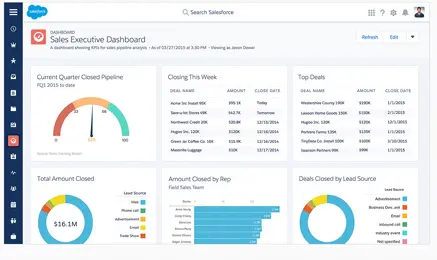 Salesforce is a good CRM example